Go to the app

BUILT AROUND THE WORKFLOW OF PROFESSIONAL STUDIOS

Your recording studio, finally organized

A purpose-built workspace for managing projects, scheduling sessions, sharing recordings, and communicating with clients. Everything in one place, accessible from anywhere.

Try MyStudio free →

WHO MYSTUDIO IS FOR

For studios, bands, and independent producers.

MyStudio is not a generic project-management tool with music bolted on. It is built from the ground up around the way recordings are actually made, so it works for everyone who works with audio.

RECORDING STUDIO

Your operation under control

Multiple projects, multiple rooms, multiple engineers, and clients who want to know what's happening with their recording. A studio is the main scenario MyStudio was built for.

A room-based scheduler, client access to projects, time tracking, and invoicing — covering the entire workflow from inquiry to master delivery.

BAND

An album as a shared project

Demos, rehearsal recordings, lyrics, arrangements, and comments from every band member in one place — instead of a group chat where everything gets lost.

Every song has its own folder, every member can see what's new, and when it's time to record in a studio, the whole project connects seamlessly with the studio.

PRODUCER / PODCAST

A professional experience, even when you work solo

You work alone, but you have several clients at once. MyStudio gives you the structure of a large studio without its overhead — and gives your client the experience they'd expect from a professional.

Your client gets a link, listens to the version, marks a spot on the waveform, and writes what to change. You get feedback you can act on right away.

WHAT MYSTUDIO CAN DO

From the first session to the final invoice.

The goal is not to give you a hundred features you will never use. Every part of MyStudio solves a real problem encountered in day-to-day studio work.

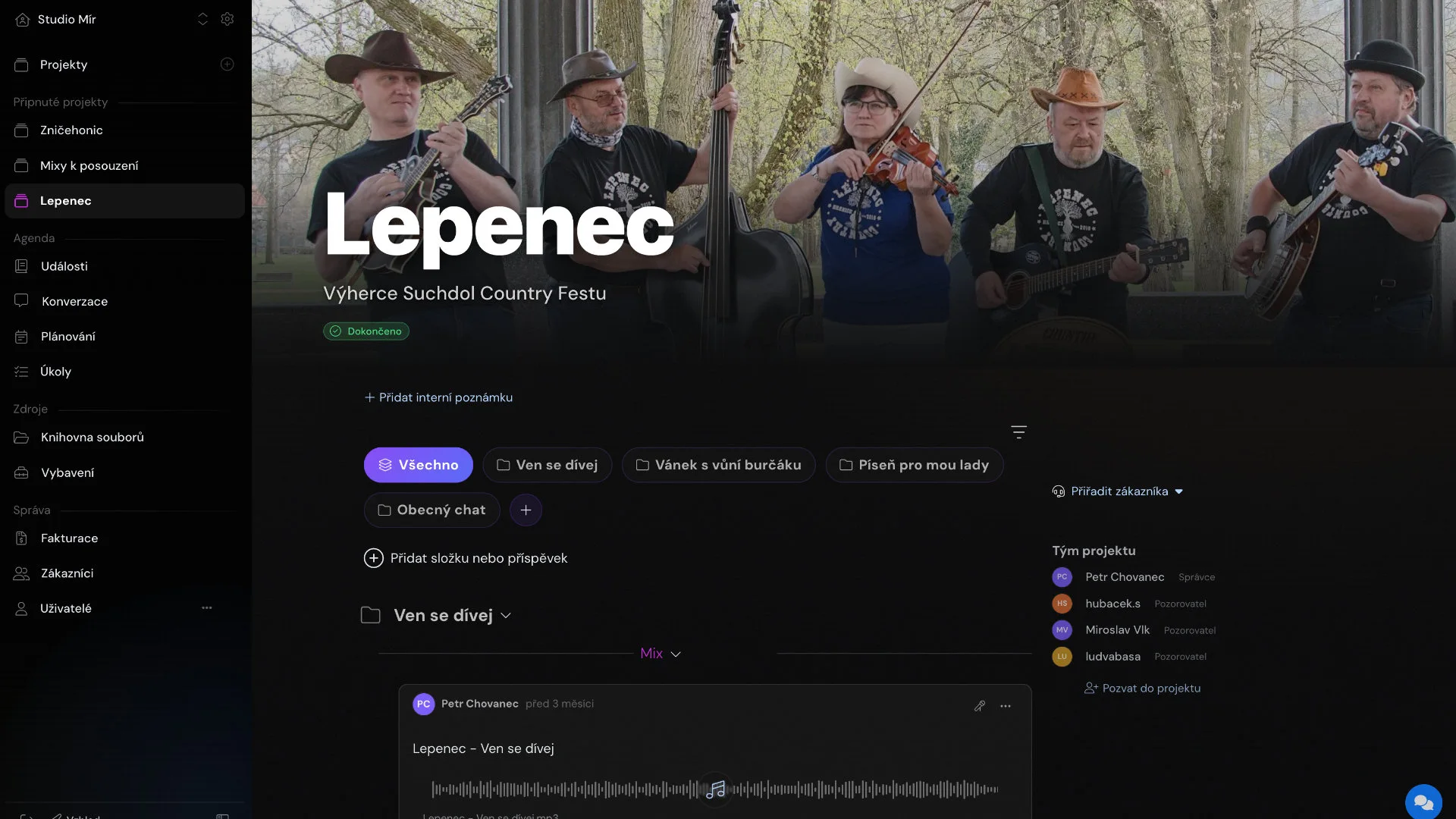
Project feed

A chronological record of everything that has happened in a project.

Songs become folders and production stages become milestones. Anyone returning to the project can understand its current status within a minute.

  • Text, audio, images, and files
  • Comments and reactions
  • Drag-and-drop folders

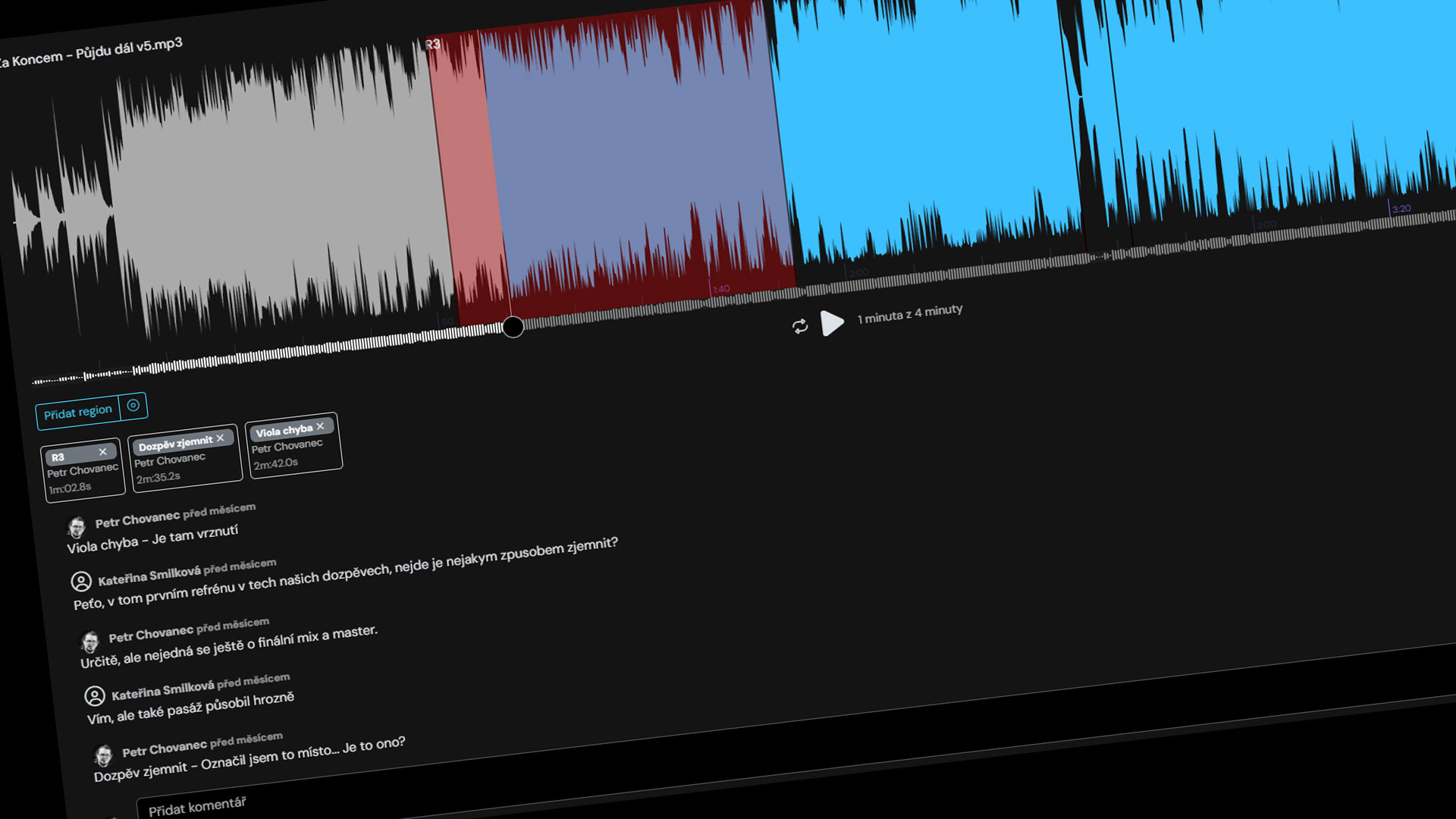
Audio comments with regions

Clients highlight an exact region in the waveform and leave a note.

No more guessing which part someone meant. You can see the exact seconds they are referring to and filter feedback by region.

  • Waveform regions
  • Time-specific comments
  • Feedback filtering

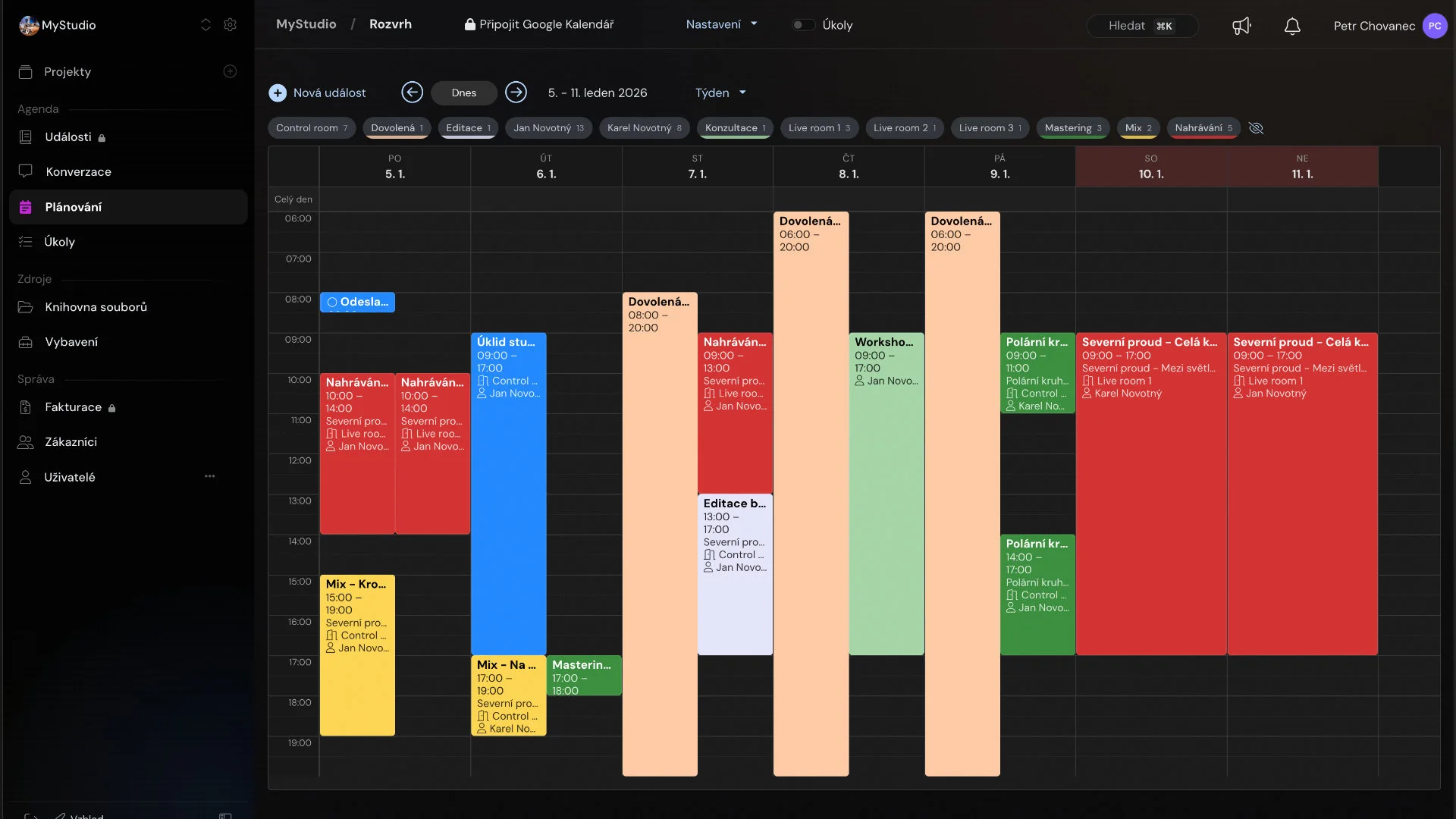
Session planner

A calendar organized by rooms and engineers.

Color-coded production stages, holidays, maintenance, and Google Calendar integration in one clear overview.

  • Rooms and engineers
  • Drag and drop
  • Google Calendar

Client access

Clients see their project and nothing else.

They can listen, comment, and approve in a browser on desktop or mobile, without installing anything or learning another application.

  • Secure access
  • Desktop and mobile
  • Version approval

Time tracking and invoicing

Time is assigned to the right service, project, and engineer.

Use a start/stop timer or enter time manually, then turn the resulting report into a PDF invoice in a few clicks.

  • Start/stop timer
  • Project reports
  • PDF invoicing

AI project summary

Catch up with a project in thirty seconds.

AI summarizes what has happened, what is waiting for approval, and the most logical next step.

  • Activity summary
  • Pending approvals
  • Suggested next step

Notifications that make sense

In the application, by email, and as mobile push notifications.

You know about important changes immediately, and clients are notified whenever you upload a new version.

  • Email and push
  • Notification controls
  • Digest messages

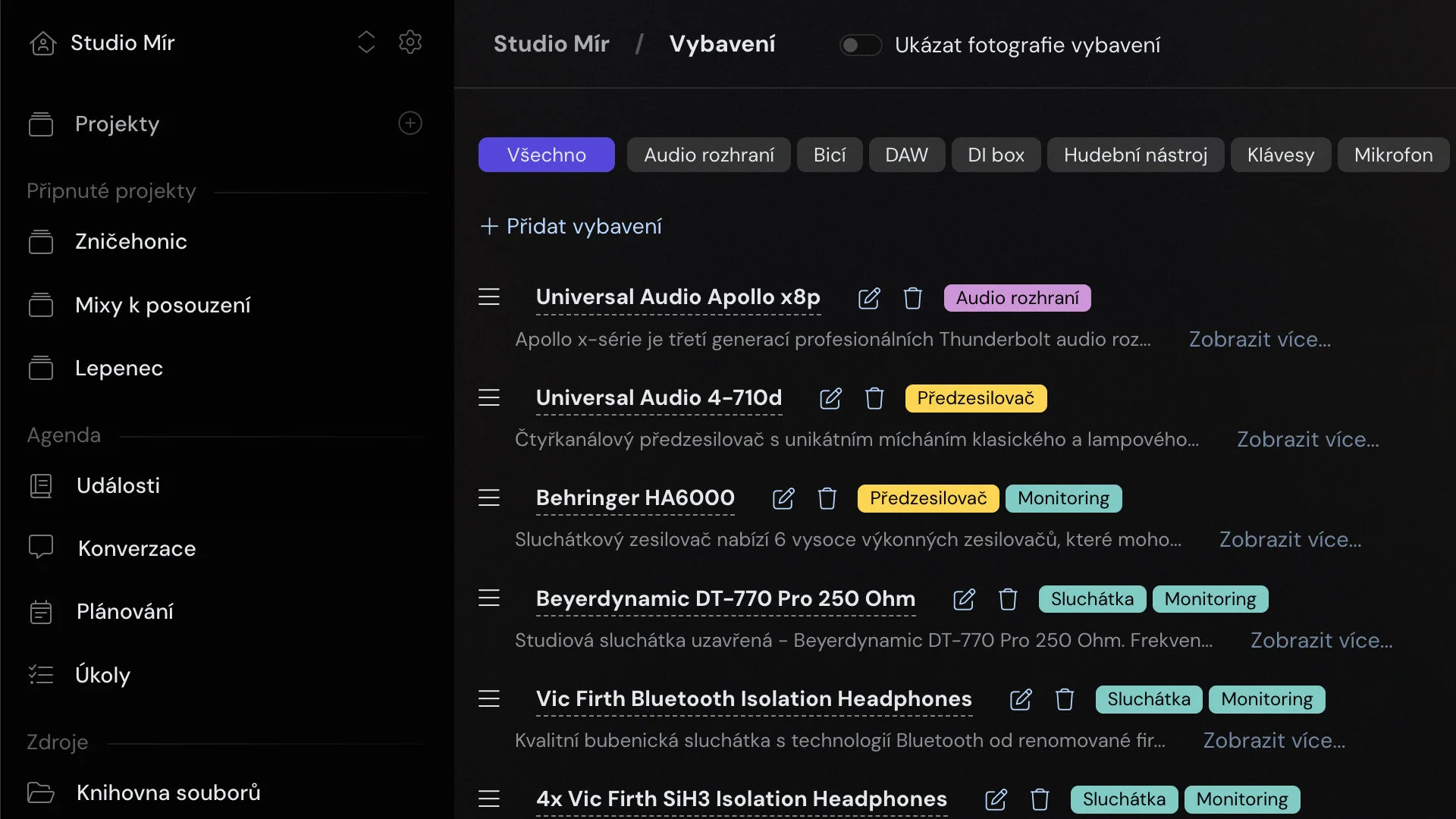
Equipment inventory

Microphones, preamps, headphones, and instruments in one place.

Status, categories, and notes support everyday operation, servicing, warranty claims, and insurance.

  • Equipment categories
  • Status and notes
  • Service history

Public studio profile

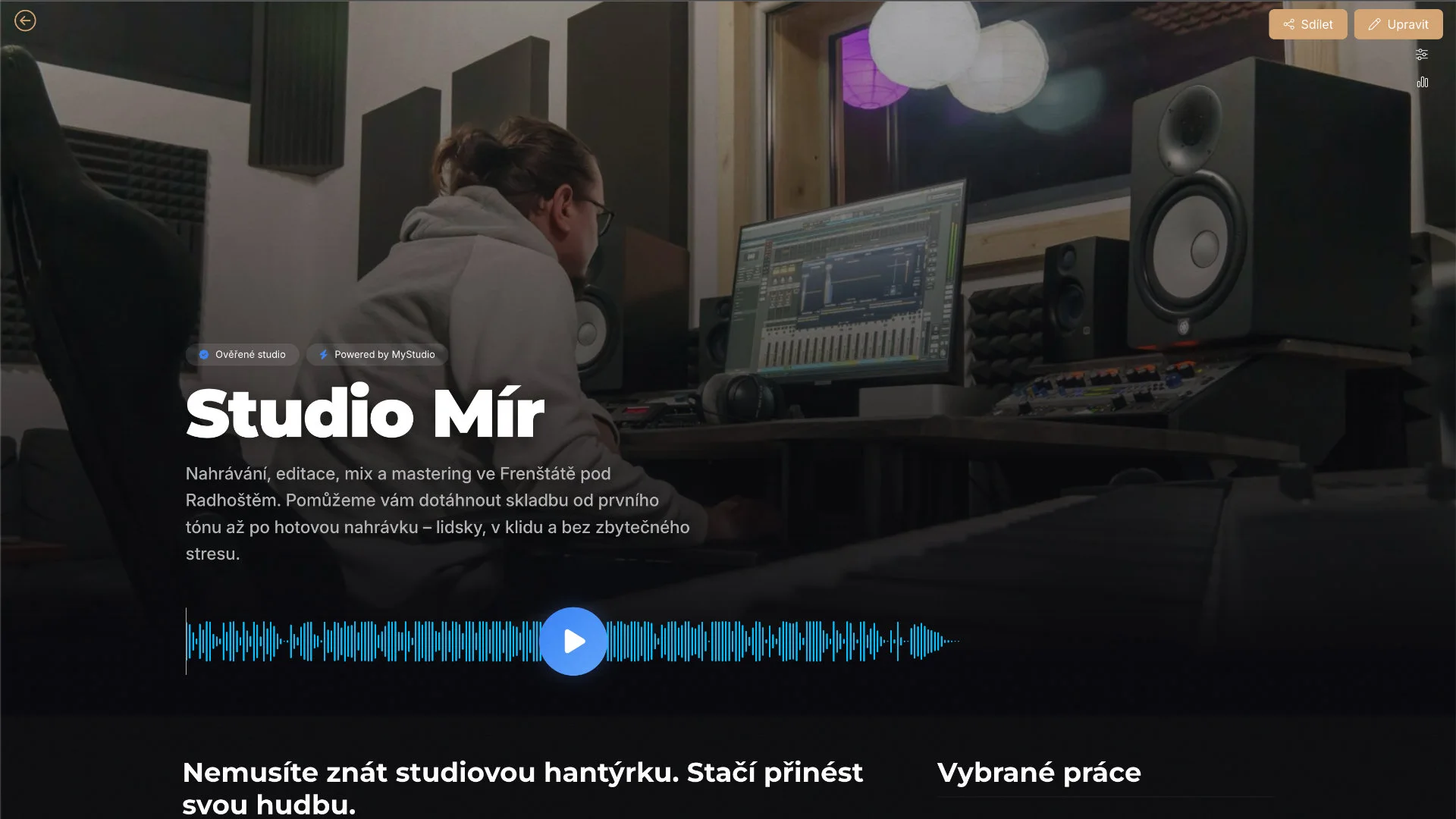
A portfolio that plays, on your own web address.

Build audio samples, testimonials, a gallery, team profiles, and contact details from blocks directly in MyStudio.

  • Audio portfolio
  • Block editor
  • Your own public address

A free space for your clients

An invited client can create their own workspace.

Bands can keep demos, lyrics, and member comments together, while artists can build a public profile of their own.

  • Private band workspace
  • Public artist profile
  • Connected studio projects

TAKE A LOOK INSIDE

This is what it looks like in practice.

No marketing mock-ups. The screens below come directly from the application and from projects used to refine MyStudio in real studio operations.

The whole story of an album in one timeline
PROJECT FEED

The whole story of an album in one timeline

From the first demo to the approved master.

Every song has its own folder and every production stage its milestone. Scroll through the feed to see what happened, who said what, and which version is current.

  • Folders for songs, milestones for stages
  • Text, audio, images, and files in one thread
  • Comments and reactions
  • Drag-and-drop organization
Feedback precise to the second
AUDIO PLAYER

Feedback precise to the second

The place where MyStudio saves the most frustration.

Select a region in the waveform and add a comment. Feedback can then be handled systematically, region by region.

  • Waveform regions and timestamps
  • Comments tied to exact moments
  • Feedback filtering
  • Streaming without downloads
Who is recording where and when
SESSION PLANNER

Who is recording where and when

A weekly overview organized by rooms and engineers.

See the workload of the entire studio and any availability for the next booking at a glance.

  • Calendar and timeline views
  • Filtering by room, engineer, and stage
  • Google Calendar integration
  • Tasks in the planning view
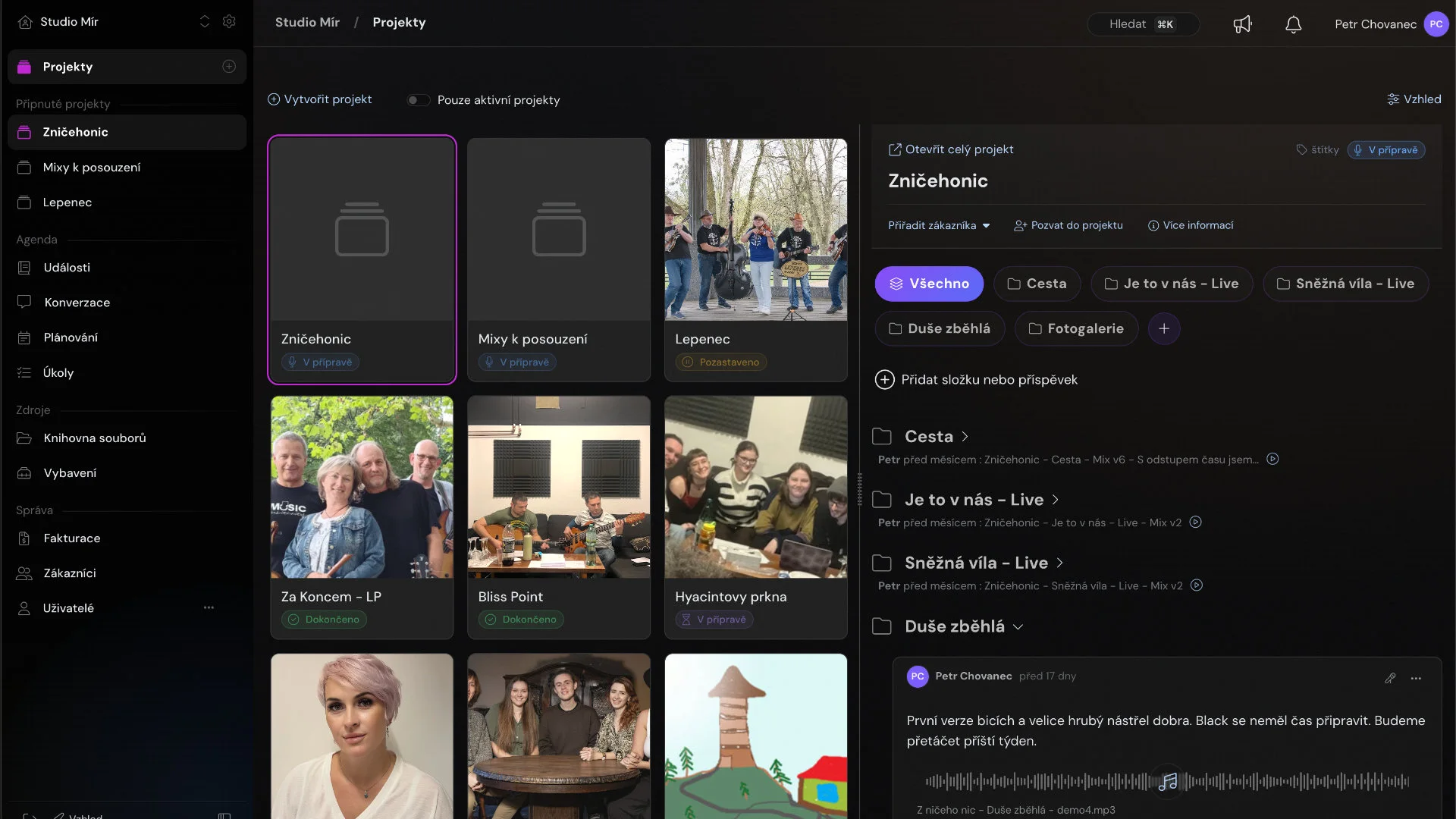
Every job on one screen
PROJECTS AND CLIENTS

Every job on one screen

See the latest changes directly on each project card.

Archive completed projects without losing history and invite a client with one click.

  • Latest changes on project cards
  • One-click client invitations
  • Archive without losing history
  • Three display densities
Your studio knows what it owns
EQUIPMENT

Your studio knows what it owns

Microphones, preamps, interfaces, headphones, and instruments, each with a category, description, and notes.

Record faults directly against an item so information for servicing, warranty claims, and insurance stays with the equipment itself.

  • Equipment categories
  • Condition and notes
  • Drag-and-drop sorting and filtering
A business card that plays
PUBLIC PROFILE

A business card that plays

A portfolio with audio samples, testimonials, a gallery, team profiles, and contact details.

Build your profile from blocks and add audio samples directly from completed projects. For a smaller studio, it can replace an entire website.

  • Audio samples with an on-page player
  • Flexible content blocks
  • Live profile editor
  • Your own public address
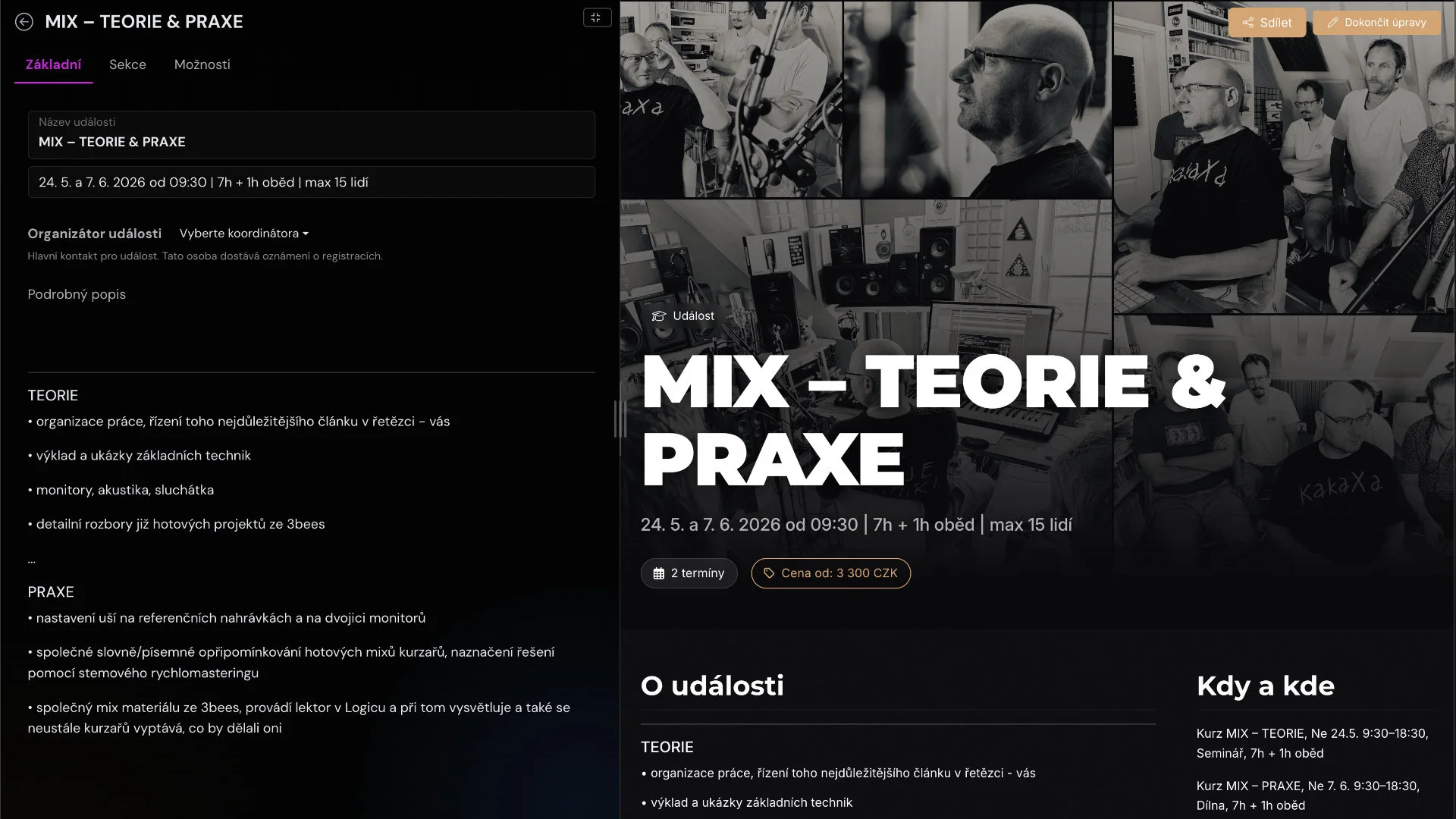
Edit the page and see the result immediately
PROFILE EDITOR

Edit the page and see the result immediately

The public-profile editor works directly alongside the live page.

Enable blocks and add content on the left while seeing exactly what visitors will see on the right. Add selected work, including audio, directly from finished projects.

  • Live page preview
  • Blocks enabled with one switch
  • Audio samples from completed projects

A FRICTIONLESS START

Be up and running in one evening.

No data migration, consultants, or team training. Your first real project can be running the same day you create your account. If you want to explore the workflow first, open the demo studio and see scheduling, project structure, and client communication in action.

  1. 01

    Create your studio

    Registration is free and no payment card is required. Add your logo, description, rooms, and services. Project templates for albums, singles, and podcasts give you a useful structure from the start.

  2. 02

    Set up your first project

    Upload a work-in-progress mix or begin from scratch. Add songs and production stages in minutes, or use a prepared project template.

  3. 03

    Invite your team and client

    Everyone sees exactly what they need. Your team works in the project while the client can listen, comment, and approve without installing another app.

WHY MYSTUDIO EXISTS

Built in a studio, not a boardroom.

MyStudio did not begin as a start-up idea in search of customers. It grew out of real frustration: hunting for the right version, feedback scattered across chats, and clients asking for information that had already been sent by email.

It is built by two people: a software developer with twenty years of experience and a recording engineer who works behind the console every day. Every feature is tested against real studio work before it reaches you. If it does not hold up in practice, it does not stay.

„We do not want to change how studios work. We want them to keep doing exactly what they do now, only without the chaos around it.“The MyStudio team

That is why MyStudio follows the language and logic of recording work: projects, songs, stages, versions, regions, comments, and approvals.

FOUNDING STUDIOS

The first 10 studios are building MyStudio with us.

MyStudio is a young product, and we make no attempt to hide it. That is exactly why founding studios receive something established platforms cannot offer: a genuine say in where the product goes and terms that grow with them.

  • Permanent founding terms — the price you start with as a founding studio will never increase.
  • A direct line to the founders — no support form and no chatbot. You speak to the people who build and use the application.
  • Your needs shape the roadmap — features are driven by the real operations of founding studios.
  • Personal onboarding — we help with your first project, song structure, client invitations, and public profile.
I want to become a founding studio

PRICING

Start free. Pay only when it makes sense.

No commitments, no hidden fees and no notice period. The Start plan is free forever — not a thirty-day trial followed by an invoice. You only start paying when your studio grows and needs more.

START

€0/ month

free forever · no credit card

  • 1 active project
  • Project feed with posts and comments
  • Audio player with selectable regions
  • Session scheduling
  • Client access to the project
  • Public studio profile
Create your studio for free

STUDIO

from €20/ month

approx. · based on studio size

  • Unlimited projects and clients
  • Time tracking and PDF invoicing
  • AI summaries of project activity
  • Mobile push notifications
  • Equipment management
  • Unlimited project archiving
  • Priority support
Try it free

HONEST COMPARISON

How MyStudio compares to other tools.

We are not going to pretend we are the only option. Sonido and Filepass are capable tools, and for some workflows they may be a better fit. Sonido comes closest to MyStudio in scope, but its full feature set is priced at a very different level. MyStudio is built around a live project feed, gives every client a free workspace of their own, starts free and is available in both Czech and English.

MyStudioSonidoFilepassDropbox
Primary focusComplete studio workflow — project feed, clients, scheduling and invoicingStudio management — CRM, bookings and financeAudio delivery and paid downloadsGeneral-purpose file storage
Comments on audioRegions and precise selectionsReview portal included from the $99 planTime-stamped comments~Only with the Replay add-on
Session schedulingRooms and engineersMultiple rooms from the $99 plan××
Time tracking and invoicingTimer and PDF invoicesTime tracking from the $99 plan~Payment-gated downloads only×
Equipment management××
Public studio pageA complete public studio profile×~Audio player only on the Pro plan×
Free client workspaceIncludes the client’s own private space and public profile×The client remains a guest×The client remains a guest~Shared folder only
Free planFree forever, no credit card×Demo available on request×14-day trial only2 GB
Languages and supportCzech and English interface, direct support×English only×English only~Czech interface, no local support
Starting priceFree / from approx. €20 per month$29 per month*$19 per month**Free / from approx. $12

* Sonido Starter ($29) supports one user and one active project. Its full studio feature set, including multiple rooms, online booking and review tools, is available on the Professional plan at $99 per month. ** Filepass price shown is based on annual billing; the monthly plan is $24. Information was checked against official pricing pages in July 2026 and may change.

FREQUENTLY ASKED QUESTIONS

Before you ask.

Does my client need to install anything or create an account?

No. Send your client a secure link that opens in their browser. They can listen to the mix, highlight an exact region in the waveform, leave a comment, and approve the version. There is nothing to install and no new system to learn.

What if Drive and WhatsApp are enough for us right now?

They can be enough for one simple project. MyStudio saves the most time when you are handling several jobs, people, and versions at once. Files, dates, feedback, and approvals remain attached to the right project instead of being scattered across different apps.

Where are our recordings stored, and who can access them?

You control access through roles and permissions. Clients see only the projects and files you invite them to. Team members receive access based on their role, and completed jobs can be archived without losing their history.

Does MyStudio work for bands, independent producers, and podcasts?

Yes. Projects, song folders, production stages, and permissions can all be adapted to your workflow. The same system works for a large studio, a small production room, a band, or a podcast creator.

What does an invited client get?

A clear space containing every current version, date, and piece of information relevant to them. They can listen, comment on an exact time or region, and approve the result without long email threads.

Can an engineer who is not very technical use it?

Yes. The interface follows real studio work rather than accounting or corporate software. During onboarding, we can help set up the first project, roles, and workflow.

Do you have a mobile app?

MyStudio is a modern web application that works on phones, tablets, and computers. It can be added to the home screen and supports mobile push notifications, so neither clients nor engineers need to search an app store.

What happens to our data if we decide to leave?

Your data and recordings remain yours. Important files can be downloaded and completed projects archived. We want you to stay because MyStudio is useful, not because your data is trapped.

How is MyStudio different from Sonido, AudioDope, and similar tools?

MyStudio is more than a player for collecting feedback. It brings project management, studio scheduling, client communication, audio comments, team management, equipment, time tracking, invoicing, and a public profile into one workflow designed specifically for recording studios.

STOP SEARCHING FOR FILES

Your next project can run in a single feed.

Setting up your studio takes ten minutes and costs nothing. If you need anything, you can call us — not a chatbot.

Try MyStudio free →